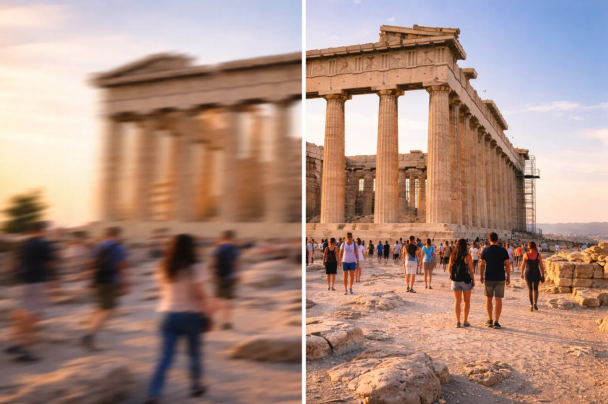
Travel photos often carry the best memories. A quiet street at sunset, a crowded local market, or a mountain view early in the morning can look amazing when you see it with your own eyes. But sometimes the pictures taken during the trip don’t look as sharp or clear as you expected. Maybe the lighting was too low, the camera moved slightly, or the image lost quality when it was shared online. The good news is that there are simple ways to fix this without paying for expensive software.
Many travelers today use online tools that help improve picture clarity quickly. With the right approach, even a slightly blurry or dull image can look much better in just a few minutes.
Why Travel Photos Lose Quality
Photos taken during trips are often captured in a rush. You might be walking, riding in a vehicle, or quickly taking a picture before the moment disappears. These situations can cause small issues such as motion blur, poor lighting, or low resolution.
Another common problem happens when photos are sent through messaging apps or uploaded to social media platforms. Many of these platforms compress images to save space, which reduces the sharpness and details of the original photo. This is why the image on your phone sometimes looks better than the one you see after uploading it online.
Some common reasons travel photos lose quality include:
- Low lighting conditions during early morning or night photography
- Slight camera movement while capturing the photo
- Compression caused by social media uploads
- Older phone cameras with lower-resolution sensors
- Images were cropped too much after taking the picture
Simple Online Tools Can Help
Instead of editing every detail manually, many people now rely on automatic online tools that improve photos with just one upload. These tools analyze the image and adjust brightness, contrast, sharpness, and resolution automatically.
One helpful option is to enhance image quality free using online platforms designed specifically for improving photos. These services can sharpen blurry images, improve lighting, and increase clarity without requiring any editing skills. This makes them especially useful for travelers who want quick results without learning complicated software.
Quick Steps to Improve Your Photos
Improving image quality does not have to be complicated. A simple process usually works well for most travel pictures.
First, upload the original image to an online enhancement tool. Most tools accept common formats such as JPG or PNG.
Second, allow the system to analyze the photo automatically. Many modern tools use artificial intelligence to detect blur, noise, and lighting issues.
Third, preview the enhanced version. You can usually compare the original and improved image before downloading.
Finally, download the improved photo and save it to your device. The result often looks sharper, clearer, and more balanced than the original.
Basic Enhancement Steps
- Upload the original travel photo
- Let the tool scan and analyze the image
- Preview the improved version before saving
- Download the enhanced photo in higher clarity
Small Adjustments Make a Big Difference
Even small improvements can make travel photos look much better. Adjusting sharpness helps define edges in landscapes or buildings. Improving brightness helps photos taken during sunset or cloudy days. Noise reduction removes the grainy look often found in night photos.
Other useful improvements travelers often apply include:
- Increasing resolution for clearer prints
- Correcting color balance for natural tones
- Removing grain from low-light images
- Cropping photos to focus on the main subject
- Enhancing contrast to highlight details
Many travelers also crop images slightly to focus on the main subject. Removing unnecessary space from the edges can make a photo feel more professional and visually balanced.
For more general information about digital photo editing and image processing techniques, you can also explore resources from organizations such as Adobe, which provide guides on improving image clarity and resolution.
Enjoy Your Travel Memories in Better Quality
Your travel photos represent real experiences and personal memories. Enhancing their quality helps preserve those moments more clearly and vibrantly. Instead of letting blurry or dull pictures stay hidden in your gallery, a quick enhancement process can bring them back to life.
With simple online tools available today, anyone can improve their travel photos in minutes https://enhance-image-quality.com/. Clearer images make it easier to share memories with friends, create travel albums, or post beautiful pictures online that truly reflect the experience of the trip.